


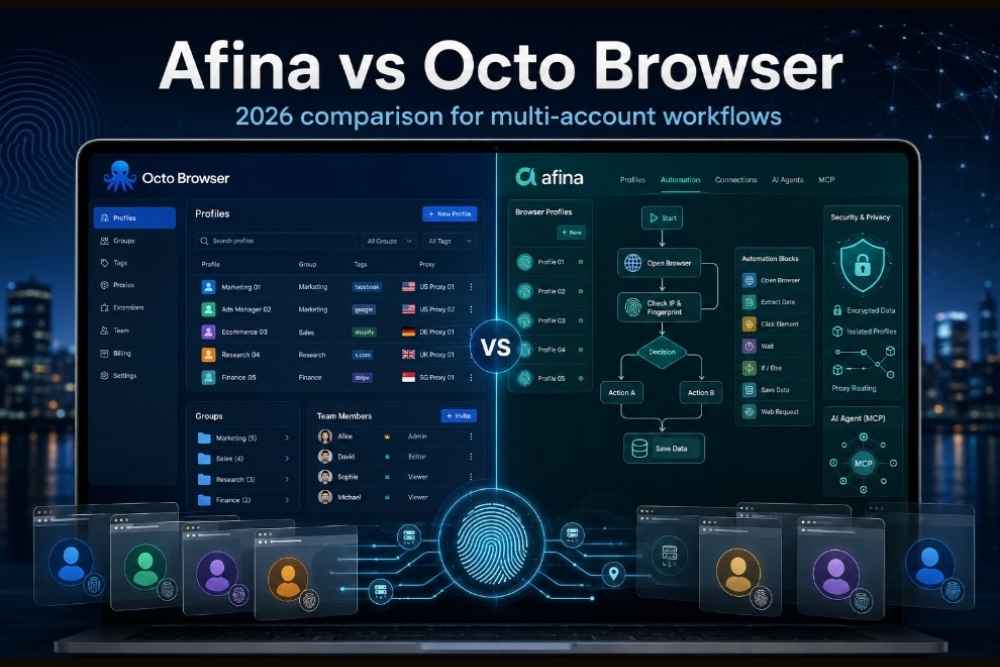
In 2026, antidetect browsers are no longer niche tools used only by traffic arbitrage teams. Affiliate managers, agencies, e-commerce sellers, SEO specialists, and link builders now deal with the same basic problem: one laptop, many accounts, many platforms, and a growing risk of account links through browser fingerprints. That is why the Afina vs Octo Browser question comes up more often now.
This article is not a ranking. It is a practical comparison of two different approaches to the same category. If you need a stable antidetect browser for structured daily profile work, the answer may be different than if you need automation, stronger local encryption, or modern network routing. The right pick depends less on brand preference and more on how your team actually works.
What an antidetect browser actually does
An antidetect browser creates isolated browser profiles that look like separate real devices. Each profile can have its own User-Agent, canvas output, WebGL data, fonts, timezone, language, screen resolution, cookies, local storage, and proxy connection. To a platform, these profiles should not look like ten chrome browser profiles opened from the same machine.
Platforms care because browser fingerprinting helps them connect accounts. Even in the absence of any cookies, Facebook Ads, Google Ads, Amazon, marketplaces, social networks, and crypto exchanges may still monitor device signals based on browser fingerprinting, IP fingerprinting, and browser storage data.
A standard anti detect browser gives you profile isolation, cookie isolation, proxy support, team access, and tools for managing many browser profiles. In simple terms, anti detect software helps reduce cross-account signals. For anyone searching for an anti detect browser for multi accounting, this is the baseline: separate profiles, separate fingerprints, separate sessions, and fewer obvious overlaps.
Quick verdict
Octo Browser is the established option. It has a strong name in traffic arbitrage, a mature product feel, refined team workflow UX, profile templates, tags, action history, and a built-in proxy shop. That makes it a good fit for teams that already have a structured operating model and spend most of their day inside profile management screens.
Afina Browser feels more like a newer antidetect platform built around architecture and automation. Its stronger points are UDP and QUIC routing, visual RPA, signed Node.js modules, MCP server support for AI agents, and a zero-knowledge encryption model. That makes it more interesting for teams that want the browser to become part of an automation stack, not just a workspace for manual account work.
Fingerprint quality and anti-bot resistance
Fingerprint quality is the first thing most people ask about, and rightly so. A browser can have a clean interface and good pricing, but if the browser fingerprint test looks suspicious, the rest does not matter much.
One public way to compare this is fingerprint.com’s bot-detection test. One useful metric there is tampering_ml_score, a machine-learning based signal that tries to detect whether the browser environment looks modified or automated. Lower is generally better because it suggests the session looks more like a normal human browser. Browser fingerprinting is just one of many anti-fraud tools’ signals, but it remains a useful browser fingerprint test to run.
To ensure that there will be no misunderstanding due to external conditions, both tests need to be run under identical circumstances – the same device, operating system, proxy service, browser range versions, and profile warm-up procedures. Without these controls in place, numbers may become deceptive rather than helpful. When I write this draft, I will refrain from publishing any conclusive results until they are generated again using the same settings.
| Test from fingerprint.com | Afina | Octo Browser |
| tampering_ml_score lower means more human | Test required | Test required |
| Bot detection verdict | Test required | Test required |
Source: fingerprint.com public bot-detection test, to be conducted in May 2026 or before publication. One-shot test, not a universal verdict.
That last sentence matters. A single browser fingerprinting check is useful, but it is not a universal verdict. Real account survival also depends on proxy quality, account history, behavioral patterns, platform risk level, and whether the operator creates unnatural account activity.
Network stack: proxies, UDP, and modern protocols
Both tools support the proxy basics that most marketing teams need: HTTP, HTTPS, and SOCKS5 proxy connections in ordinary TCP workflows. For many SEO, affiliate, and marketplace tasks, that is enough. If you are logging into accounts, warming cookies, checking dashboards, or publishing content manually, the proxy provider and account history may matter more than exotic protocol support.
Octo Browser has one practical advantage here: the built-in proxy shop. For a team that does not already have a reliable proxy provider, this saves time. You can buy, top up, check, and assign proxies without jumping between several tabs and spreadsheets. That is a real workflow convenience, especially for junior operators.
The newer tool’s more technical difference is UDP routing through SOCKS5 and support for QUIC and HTTP/3. Since QUIC protocol uses UDP connection, it becomes necessary for many web services including various Google products, YouTube, CDN and media-heavy sites, etc. As a result, in an otherwise TCP-only setup, QUIC might have trouble connecting or even downgrading to HTTP/2. In some cases, UDP traffic can also become a leak vector if it bypasses the proxy.
This does not matter for everyone. If your work is mostly simple dashboard access, outreach, or marketplace checking, UDP support may not be the deciding factor. But for workflows touching modern Google properties, video platforms, or strict network checks, it becomes a real differentiator.
Automation via API, RPA, AI agents
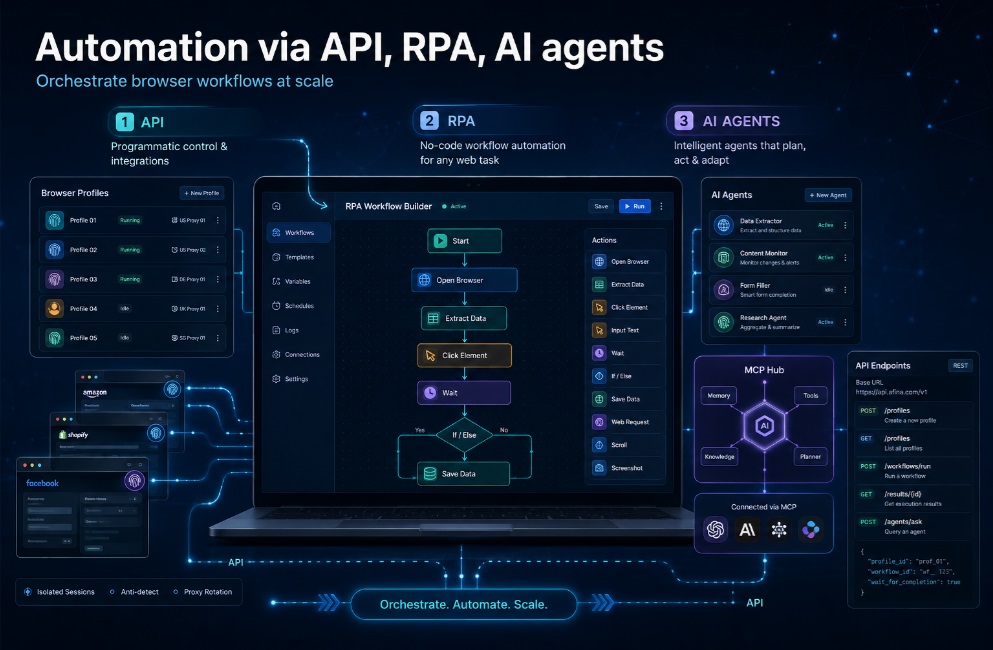
Both solutions allow automation via API. Octo Browser has detailed documentation for API and is compatible with well-known browser automation libraries like Playwright, Puppeteer, Selenium, CDP. This should be sufficient for teams already having some Python or Node.js code. You configure profiles, use proxies, launch sessions and execute the automation layer keeping the browser as the profile runner.
Afina Browser brings another level on top of that. It provides a visual designer of RPA flows enabling users to assemble automation flows using clicks, waits, branches, loops, extraction of data, screenshots, uploading files and so on. This is important since marketing teams need to automate repetitive work while not turning every minor change into tickets for developers.
The second layer is custom Node.js modules. These are npm-style modules that can be called from RPA flows through an executeModule block. That gives teams a bridge between no-code steps and real code. A simple flow can handle navigation and form logic, while a module handles API calls, parsing, wallet checks, data formatting, or anything else that is easier in code. The modules are Ed25519-signed, which adds a supply-chain safety layer.
The third layer is MCP server support. MCP, or Model Context Protocol, lets AI agents interact with tools in a structured way. In practice, this means Claude, Cursor, ChatGPT-compatible agents, or custom agents can drive browser profiles through a defined interface. As of 2026, it is considered novel within the antidetect browser category. Although it may not be necessary for all teams, it would come into play if you are working on AI-based account management, research processes, quality assurance activities, and browser automation functions.
The honest split is simple. Octo Browser is strong if your team already automates through external scripts and wants a stable profile system. Afina Browser is stronger if you want automation to live inside the browser environment itself.
Team workflows and profile management
This is where the established product deserves credit. Octo Browser is built for teams that live inside the browser manager all day. Role-based access, tags, templates, action history, proxy management, filtering, and profile activity logs are not minor details. In a 20-person affiliate or arbitrage team, small UX improvements save hours because operators repeat the same actions hundreds of times.
Its templates are useful for teams that need consistent profile creation. Tags make large sets of accounts easier to group. Action history helps managers understand who opened, changed, or synchronized a profile. These things sound basic, but they matter when there are hundreds of profiles and several people touching the same account pool.
Afina Browser covers team roles, bulk profile actions, import from other antidetect tools, Cookie Robot, triggers, backups, a task scheduler, and an email module. The direction is slightly different. It is less about being only a profile table and more about connecting profiles with tasks, scripts, triggers, and data flows.
So the decision depends on the team shape. For a mature arbitrage team with strict profile ownership, tags, templates, and action logs, Octo Browser has a real UX advantage. For an agency or SEO team that wants scheduled flows, custom logic, mailbox events, and AI-assisted work, the newer architecture may pay off faster.
Security architecture: who can read your account data

Security is often treated as a checkbox in antidetect reviews, but it deserves more attention. These browsers may store cookies, account variables, API tokens, mailbox access, proxy credentials, seed phrases, client account data, and other sensitive material. For agencies and crypto teams, the question is not only “can the browser prevent browser fingerprinting?” but also “who can read the data if something goes wrong?”
Afina Browser uses a zero-knowledge model. The secret encryption key is generated on the user’s device and sealed with a master password. The master password is not sent to the server. Cookies, vault secrets, account variables, and API tokens are sealed locally before they touch disk or cloud storage.
This model has a serious tradeoff. There is no normal password recovery path. If the master password is lost, the encrypted data cannot simply be restored by support. That is similar to a non-custodial crypto wallet. The user gets stronger control but also more responsibility.
The same security logic appears in signed code execution. Extensions, RPA scripts, and Node.js modules are signed with Ed25519. If a file changes, the signature check fails and the executor refuses to run it. This is useful protection against silent supply-chain swaps or accidental module corruption.
For comparison, Octo Browser documents two-factor authentication, profile passwords, and end-to-end encryption for profile data. That is good, but I would not describe it as the same zero-knowledge architecture unless the vendor clearly documents a client-side master key model where the server cannot decrypt sensitive profile data. For casual multi-accounting, this may not be critical. For crypto, high-value accounts, and agencies handling client secrets, it can be a deciding factor.
Pricing and trial access
The pricing varies, and therefore, this part needs to be reviewed before publishing. According to the latest published price list, Afina Browser provides monthly pricing options from Lite ($9 for up to 20 profiles), Starter ($19 for up to 50 profiles), Base ($29 for up to 100 profiles), Standard ($69 for up to 300 profiles), and Max ($129 for up to 1000 profiles). Extra users appear on higher tiers.
Octo Browser’s public pricing starts with Lite at €10 per month for 3 profiles and Starter at €29 per month. Its documentation also describes higher tiers such as Base, Team, and Advanced, with more profiles, team members, API access, templates, saved proxies, action logs, and profile tasks depending on the plan. The vendor’s own materials state that it does not offer a free version, with Lite used as the low-cost way to test the product.
Pricing should not be the headline argument here. Both tools sit in the paid professional software category. If budget is the deciding factor, you are probably overpaying somewhere else in the stack first: weak proxies, burned accounts, manual work, duplicated tools, or poorly managed operators.
Main comparison table
| Feature | Afina | Octo Browser |
| Chromium-based fingerprint engine | Yes | Yes |
| Real-device fingerprints | Yes | Yes |
| fingerprint.com tampering_ml_score | Test required | Test required |
| HTTP, HTTPS, SOCKS5 proxy support | Yes | Yes |
| UDP traffic plus QUIC and HTTP/3 | Yes | Not documented |
| Built-in proxy shop | No | Yes |
| Visual RPA editor with no-code flows | Yes | Not documented |
| Custom Node.js modules with npm | Yes, Ed25519-signed | Not documented |
| MCP server for AI agents | Yes | Not documented |
| Public API | Yes | Yes |
| Built-in task scheduler | Yes | Profile tasks documented |
| Built-in email module | Yes | Not documented |
| Role-based team access | Yes | Yes |
| Templates, tags, action history | Basic to moderate | Strong |
| Profile import from other antidetect browsers | Yes | Import and export documented, cross-tool import not clearly documented |
| Zero-knowledge encryption with client-side key | Yes | Not documented as zero-knowledge |
| Ed25519-signed extensions and scripts | Yes | Not documented |
| Web or mobile access | Desktop documented | Desktop documented, iOS status should be rechecked before publication |
| Free trial or free tier | No free tier documented on pricing page | No free version documented |
| Platforms | Windows, macOS Intel, macOS M-series | Windows, macOS, Linux |
Who should pick which
Pick Octo Browser if:
- You run a traffic arbitrage or affiliate team already structured around tags, templates, and action logs.
- You value market maturity and a well-known name in the arbitrage community.
- You want a refined profile manager where operators can work quickly with less training.
- You do not need UDP and QUIC routing, custom Node.js modules, or MCP integration.
- The built-in proxy shop is a real convenience for your team.
Pick Afina Browser if:
- You need browser automation as a first-class part of the workflow.
- You want visual RPA plus signed Node.js modules in the same environment.
- You are building AI-driven workflows and want MCP support.
- You need UDP over SOCKS5 with QUIC and HTTP/3 for specific platforms.
- You handle crypto, high-value accounts, or client data where zero-knowledge architecture matters.
- You want antidetect, RPA, scheduling, mail, and custom scripts in one tool.
My practical take: the right choice depends on whether you treat the browser mainly as a team workspace or as an automation platform. Octo Browser is stronger as a polished daily workspace for structured account teams. Afina Browser is more interesting when the browser becomes part of your automation and security architecture. For teams comparing tools in detail, afina.io is worth checking directly before making a final call.
FAQ
Is Octo Browser still worth it in 2026?
Yes, especially for traffic arbitrage, affiliate teams, and operators who value a mature workflow. It has strong profile management, templates, tags, action history, API automation, and a built-in proxy shop.
What is the main difference between Afina and Octo Browser?
The main difference is product direction. One feels more like a mature profile-management workspace, while the other puts more focus on automation, signed modules, modern protocol routing, and zero-knowledge security.
Which antidetect browser is better for cryptocurrency operations and wallet management?
While zero-knowledge architecture makes a good case when dealing with cryptocurrencies due to the extra sensitivity of cookies, vault passwords, seed phrases, and API keys compared to social accounts, operational security cannot be overlooked. Proper password managers, physical safety of devices, proxies, and restricted access to team members also play a significant role.
Can I migrate profiles from Octo to Afina?
Yes, Afina supports import from other antidetect tools. Before doing a large migration, test a small batch first and check cookies, proxies, extensions, and account session behavior.
Do I need UDP and SOCKS5 support for multi-accounting?
Usually, no. Many ordinary multi login workflows work fine with standard HTTP, HTTPS, or SOCKS5 over TCP. However, UDP and QUIC protocols matter more in the case of YouTube, other Google services, modern CDNs, and proxy services supporting UDP routing.
Which browser is more beginner-friendly?
When it comes to working with profiles manually, Octo Browser might prove to be more comfortable since the interface is well developed for regular use. Visual RPA can become easier once you start automating actions through flows, especially if your goal is not to write too much code.
Disclaimer: This content is meant to inform and should not be considered financial advice. The views expressed in this article may include the author’s personal opinions and do not represent Times Tabloid’s opinion. Readers are advised to conduct thorough research before making any investment decisions. Any action taken by the reader is strictly at their own risk. Times Tabloid is not responsible for any financial losses.

